
Google Voice
Screenshots
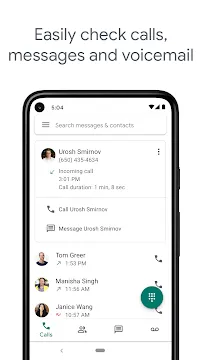
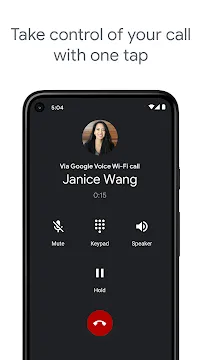
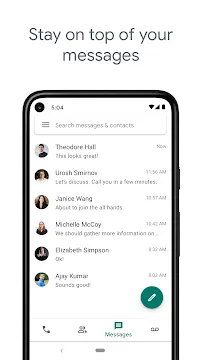
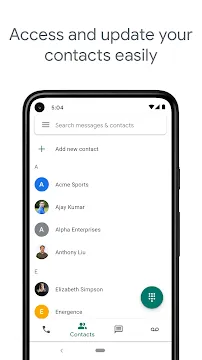
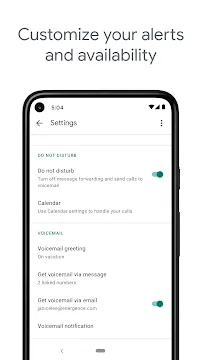
Google Voice App For Android offers a modern solution for managing your personal and professional communications through a single, dedicated phone number. Many users find it difficult to balance multiple phone lines or keep their private numbers secure when dealing with business contacts. This application provides you with a unique telephone number that works across your smartphone, tablet, and computer. You can make high-quality voice calls, send text messages, and manage your voicemail from any device with an internet connection.
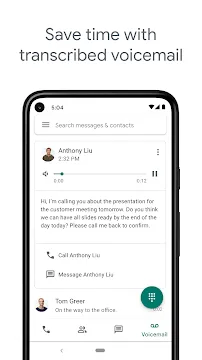
The application simplifies your daily routine by centralizing all your communication logs in one searchable history. It uses advanced technology to filter out unwanted spam calls and automatically transcribes your voicemails into text. This allows you to stay informed without needing to listen to every recording. Whether you want to separate your work life from your home life or save on international calling rates, this software provides a reliable and cost-effective platform. The interface remains clean and integrates perfectly with your existing contacts and other productivity tools.
Unified Communication Across Multiple Devices
Google Voice ensures that you stay connected no matter which device you have in your hand. When someone calls your unique number, the app can ring your smartphone, your office desk phone, and your tablet at the same time. This multi-device synchronization means you never miss an important conversation because you left your phone in another room. You can even start a call on your computer and finish it on your mobile device without any interruption.
The synchronization extends beyond just calls to your messaging and voicemail history. All your text conversations and saved messages appear instantly on every screen where you log in. This creates a seamless experience as you move throughout your day. You can reply to a client from your laptop in the morning and check the status of that conversation from your phone during lunch. It keeps your digital life organized and removes the need for manual data transfers.
Advanced Voicemail Transcription and Management
Reading your voicemail messages saves a significant amount of time during a busy workday. The application uses smart algorithms to convert voice recordings into accurate text transcripts. You receive these transcripts directly in the app or via your email inbox. This allows you to quickly scan the content of a message and decide if it requires an immediate response. You can stay productive in quiet environments like meetings or libraries where listening to audio is not possible.
The voicemail system also allows for high levels of personalization. You can record custom greetings for different groups of contacts to provide a more professional touch. For example, you can have a specific greeting for family members and another for business partners. The app stores all your recordings securely so you can refer back to them whenever necessary. It transforms a basic phone feature into a sophisticated messaging tool.
Smart Call Screening and Spam Filtering
Protecting your time from unwanted interruptions is easier with the built-in screening features. Google Voice identifies known spam numbers and automatically blocks them before your phone even rings. This significantly reduces the number of telemarketing calls you receive throughout the day. You can also choose to screen individual callers by hearing their name before you decide to answer the call. It gives you total control over who can reach you and when.
- Enable automatic spam filtering to silence suspicious callers.
- Block specific phone numbers permanently to prevent harassment.
- Hear a recording of the caller’s name before picking up.
- Direct certain contacts straight to voicemail during your off-hours.
These tools help maintain your privacy and peace of mind. If an unknown number calls, the system asks the caller to state their name. You then hear that name and have the option to accept the call, reject it, or send it to voicemail. This proactive approach to security ensures that your attention stays on the people and tasks that matter most.
Flexible Call Forwarding and Routing Rules
The application allows you to define exactly how and where your calls travel. You can set up specific rules to forward calls to different numbers based on the time of day. For instance, you can have calls directed to your office during business hours and to your mobile phone in the evening. This flexibility is perfect for freelancers and remote workers who need to stay reachable without being tied to a single location.
You can also create custom routing rules for specific people in your contact list. If you are on vacation, you can set the app to forward important family calls while sending all others to a “do not disturb” greeting. This level of customization ensures that your communication system works around your personal schedule. It eliminates the frustration of missed opportunities while protecting your downtime.
Competitive International Calling and Messaging
Staying in touch with people in other countries is affordable and straightforward with this tool. Google Voice offers very low rates for international calls without requiring you to change your mobile service provider. You can use your existing data plan or a Wi-Fi connection to place these calls, which avoids expensive roaming charges. This makes it an excellent choice for travelers and people with international business connections.
The app also supports free text messaging within specific regions, including group chats and multimedia messages. You can send photos and files just like you would with a standard carrier. The software manages your data usage efficiently to keep your costs low while providing high-quality service. It acts as a bridge between different global networks to keep everyone connected.
Seamless Integration with Productivity Tools
This communication platform works hand-in-hand with the other tools you use daily. It integrates with your calendar to automatically manage your availability. If you have a meeting scheduled, the app can send incoming calls directly to voicemail to prevent distractions. You can also start calls directly from your email interface to save time. This connectivity enhances your overall workflow and reduces the need to jump between different software.
The app also makes it easy to manage your contact information. Any changes you make to your contacts on one device update everywhere else instantly. You can search your entire history of calls and texts using keywords to find specific information from months ago. This deep integration ensures that your communication history remains a valuable and accessible resource for your personal and professional growth.
Final Thoughts
Google Voice App For Android provides a comprehensive and intelligent way to manage your modern communication needs. By offering a single number that follows you across all your devices, it eliminates the confusion of multiple lines and missed calls. The advanced transcription and screening features protect your time and keep you organized. Whether you are a business professional looking for a dedicated line or an individual seeking better privacy, this tool offers the right balance of control and simplicity. It transforms your smartphone into a more capable communication center that adapts to your unique lifestyle. You can stay connected, save money, and maintain your privacy with ease every single day.